The Motorama 2015 All-Bots Update: The Revival of Candy Paint & Gold Teeth, Überclocker Advance Inspection

With Boston getting mashed by blizzard after blizzard literally once every weekend for the past month, there’s not much to do save for hunting baby seals for their meat and blubber working on robots! Especially as wave after wave of cancellations hit MIT to the point where I’ve had to reschedule several shop orientations as well as cram 2 days of lecture content into one for a new black project class I’m helping with… but more about that later. And suddenly, Motorama 2015 is but a week away! And Dragon Con 2015 is next Tuesday, clearly.

Contrary to previous years, I have a temporary moratorium on new bot construction, choosing instead to try and make my current fleet a bit less fail before moving on. This was spurred on mostly by Überclocker being basically perfect by placing at the past 3 events: Motorama 2014 and Dragon Con 2013, and finally winning at Dragon Con 2014, for which I redeemed my karma points on the return trip. I thought it only fair to give Candy Paint & Gold Teeth the same treatment this time around. Last year, due to a whole stack of beginning-of-semester shop issues, I only had days to work on it and the whole bot was extremely rushed on the last mechanical details and the entire electrical system. In large part, the internals were held in by hot glue. This year, as I act as mentor to a host of new MIT-area based builders (who I’ll definitely introduce on this site in the event report!), I’m going to integrate the lessons learned (read: all of them) from last Motorama and finish the bot like I intended.

The following work was from maybe Mid-January to about 2 weeks ago…

Step 1? Actually look at the damn thing! I knew it was all hot glue and zip tied by Adam and company last year, but not how badly. And I will just say… my god.

Now, in reality, I think those lipoly packs are more secure in there with their 10 square inches of Velcro, half-dozen zip ties, and generous fillets of hot glue per each, than anything else I can come up with – including the original sheet metal battery cages. But this also makes them utterly irreplaceable, and Candy Paint ended the event with a dead cell, so these had to definitely go.

The placement of the motor controller was also not optimal, and… well, should I really waste time listing everything that’s wrong with an on-the-fly wiring job?

The next course of action, much like pre-NYMF Chibi-Mikuvan, was to rip everything out and start over. This actually took much more effort than it sounded. Recall that both lithium packs were held in by no less than 10 square inches of Velcro. Real 3M-branded Velcro. We might as well have welded them in.

I got as far as heartstoppingly buckling one of the packs in half by a few degrees before trying other solutions.

It’s actually very, very hard to remove sticky-back Velcro of reputable source, such as if real 3M adhesive is behind it. I ended up pouring acetone into the cavity that surrounds the battery and waiting several minutes while slowly applying upward pressure on the battery wires. The acetone slowly damages the adhesive along the peel front, so the whole thing very slowly lurched upwards and eventually gave up.

Extracting the smoked controller to inspect the depth of destruction. Two of the phase wires desoldered themselves, and the 3rd leg was also a total loss. Ouch…

One of the higher priorities for me was rewinding the weapon motor. The original winding had a short-to-core to begin with, which might have contributed to the controller’s untimely death. I couldn’t identify the location exactly, but there are at least 2 spots per phase where I pulled the wire bundle over bare metal, so the chances were good that I would have shorted something a little.

The issue is that I ran out of the specific size of 70mm stator used in the motor. I have a handful of 70mm stators spread across two types – one with a 32mm center bore, and another with a 26mm one. I designed the motor around the 32mm type, and the only ones I had left were damaged salvage cores from copier motors. Due to how much epoxy I poured over the first stator, I decided it was still better to repair the ones with damaged coatings.

Pouring epoxy over the exposed metal is actually a very unreliable fix, because of the way the original coating wraps around and smooths the edges of the steel. Instead, I had something better:

I had these sheets of “electrical grade hard fiber” from McMaster from past projects. It’s also called “fishpaper”, contains no fish nor shellfish, is gluten-free, and is a resin-impregnated heavy cardstock-like material. Laser cuts beautifully into stator-shaped pieces. I used the model of the stator that I measured up to design the motor for the 2D profile, with the arms and tooth ends purposefully thickened a few percent to not leave any metal exposed. This whole sheet was then applied to the cleaned steel surface with epoxy.

Next up was rewinding. My goal was not only to make a clean winding, but also slow the weapon down. Wait, even more?

The two fights Candy Paint got in at Motorama 2014 showed that the weapon already had enough impact power for my liking, and I try to favor reliability over the so-called “brushless penis contest” in the combat robot world of ever-larger motors and spinning weapons, often to impractical proportions. Trust me, I used to be one of the young boisterous men responsible.

Candy Paint’s bar was designed to spin at 180mph. I would be perfectly content with 120 or even 100, with super rapid spin-up time and excellent “upside-down flailing” torque. To get to this point with the same gear ratio meant increasing the turns on the weapon motor’s stator poles by 50%, which entailed going to… oh, six turns per tooth instead of four. Still easy compared to my 36+ turn hub motors! Either way, a new piece of string to measure the wire length needed was test wound around the four teeth of a phase.

The “hobbykinging rig” was, like last time, wrapped 3 times around a set of 10ft-apart table legs to generate 3 parallel bundles of 9 parallel wires. This gave the motor the equivalent of 14 gauge windings, except far, far easier to wind than a single solid 14 gauge bar.

A half hour or so later… a motor appears! See, low turn-count motors are super easy to wind! A custom hub motor often takes me like 2 or more hours each.

The aluminum bearing cap was thoroughly covered in thickened epoxy before I started pulling wires over it. I left roughly 10″ on each winding end and put heat shrink tubing over them to use directly as output wires.

But the next issue was, once again, how to solder bullet connectors to them. Enamel-coated magnet wire is difficult to solder without resorting to disgusting measures, such as dunking in molten sodium hydroxide or highly acidic fluxes. Or torches and mechanical removal (sanding, scraping). Doing that on a 27-strand bundle was out of the question. I did that last time…

I started haunting the Internet for anecdotes of the “Well, my mama told me to use yak milk and that’s never failed me!” nature. Could I get yak milk around here? Probably, if I look hard enough. But one curious substance showed up repeatedly: average automotive brake fluid. Hey, I don’t have a yak, but I have something about yak-sized that needs brake fluid, so I have some bottles of brake fluid!

When I thought about it a little more, it made sense. DOT 3 and 4 brake fluid is made of glycol esters, which are also found in paint strippers. In fact, brake fluid itself often has “do NOT get on your paint, like seriously” written all over it. So when you heat it up, of course it’s going to attack and damage the enamel coating too.

I was fairly certain from MSDS-haunting that burning brake fluid was not acutely toxic, but also sure that it isn’t good for me in any way, so this step was done with plenty of ventilation.

Well I’ll be damned. Dip the end of your magnet wire bundle in a tiny little bit of brake fluid, and using a large iron, solder as normal. I would estimate the solder flowed 1/3rd as fast as it would on a bare wire, but each of these joints was made in under 15 seconds. None of the inconsistent flowing, burning, blobbing up of flux, etc. I’ve experienced in the past.

This has been your “Well, I’d say don’t try this at home, but that defeats the purpose of putting it on the Internet” moment of this post.

Now, it’s important to point out that DOT 5 brake fluid is made of silicone and probably won’t work in this application.

Installing the motor for a quick spin and fit test!

Finally, I folded the sheet aluminum battery retainers. Each battery will still have a few square inches of more reasonably-placed Velcro padding underneath it which should handle the majority of loads, and this cage is just to prevent them from being sucked into the spinning cheese-grating pulley below them!

Before putting the batteries permanently in, I wanted to try and fit the motor controller in the same region as the motor. This is so the wiring was less chaotic up front, and the controller at least had a modicum of convective cooling available.

Keeping the wires down was more of a challenge than packing the ESC in. I made these polycarbonate retaining strips that have their ends heat-bent up into a hook shape, and are quite difficult to remove. I’ll probably back this area up with a cable tie or two to more guarantee the plastic not flying away.

The ESC has been switched to the 150A K-Force since I’m only running 6S in this bot now. There’s no need to specify a high-voltage 12S capable ESC! Architecutrally, it’s identical to the “Sentilon” HV version.

Final installation of the wiring. There’s a sad empty spot to the right that needs filling with some gaudy mood lighting or something…

This isn’t it, however. All of these wires are sort of too tall and interfering with the volume that the drive pulley needs:

For basic flight testing, I stuffed everything in using massive amounts of gaffer’s tape, but this isn’t a permanent solution.

In this configuration, I found out that the bearing block was either milled 1/16″ too deep, or the bearings are collectively 1/16″ shorter than their nominal dimensions. I had to insert 0.06″ of shims into the spindle in order to have it not wobble.

I took the opportunity to swap in one of the spare pulleys I had made, since the first one was showing “bowtieing” on the D-bore due to how loosely it had been mounted before.

To resolve the wire height issue, I finally finished the bottom plate that was supposed to go on originally. To the underside of this plate are glued a succession of rigid foam rubber blocks which keep pressure on the wires, especially near the cheese-grater pulley. Notice the “0.06 of shims” that I wrote to remind myself how many shims to stuff back in…

I need to find a good hiding spot in order to get a good spinup video of this thing, or even better, some actual testing. MIT is in general so space-constrained though it’s difficult to find a location to do this in. The loading dock is all concrete, but too tight. I’d preferably want to be on a different elevation from the blade, and behind a solid concrete object…

Candy Paint on full drive power is fast. Faster than any spinner has any right to be, with a design speed of just under 16mph. I’m hoping that this balance of drivetrain and high-torque and reliable weapon will be a favorable one. It’s also very squirrelly when turning due to how short the wheelbase is, so I’ll be keeping the dual-rates switched on for this one.

One of the details that completely derailed any plans of Candy Paint domination last year was the unmodified blade. I bought this from a builder who made this blade for an invertible bot, which didn’t care which orientation it was in. Candy Paint is non-invertible by design, and the double bevel caused it to “coin” into the air on any non-perpendicular impact (read: like all 3 of them).

Solution? Just grind the bevel off. This step took a while, since the steel is hardened and my angle grinder is small (the Civilization Destroyer is only equipped with a skinny cutting, not grinding blade).

I only ground 1 bevel off on each side, so the blade can currently only “spin” one way – I made sure that this time it was in the tighten direction, instead of last time where the blade slowly worked itself off since the motor torque was trying to un-spin the nut…

Almost armed up fully. Notice how I also stripped all the paint off? This is because…

I HAVE PRIORITIES.

Can’t test it? Might as well paint it. Candy Paint and Gold Teeth is finally getting some of its namesake. The candy paint: A can of fluorescent safety orange applied like 10 layers thick and glossy-clear coated. The gold teeth: Some Rust-Oleum “gold metallic” spraypaint that, to my utter surprise, actually worked okay.

And here it is, all pretty and shiny-like. I was definitely surprised at how well the paint job turned out. Maybe my many minutes of van bodywork, being forced to spraypaint something other people are forced to look at, helped.

Like I said, I’m still searching for an opportunity to whip this thing up to full speed and run into something. It’s probably going to have to be in some deserted basement, at night, on a weekend, peering from around a corner. I’ve driven the bot around plenty, and have whipped it up to maybe 33% speed, but haven’t planted the blade into anything yet.

That’s all for the Candy Paint reboot. Time to move it off the work mat so I can take a look at …

Überclocker Advance

As mentioned originally, Clocker has been steadily growing out of its awkward engineering bug stage, from suffering several issues at Motorama 2013 to almost winning Dragon Con 2013 to almost winning Motorama 2014, to finally winning Dragon Con 2014. Now, with my #1 nemesis for 2 past Motoramas not going to this tournament, and with the Banebots wheel swap being extremely successful at Dragon Con 2014, leads me to believe that Clocker has a fair shot at the 2015 championship.

IF something stupid doesn’t happen.

That’s a well known failure mode with stuff I make. So, as long as I have plenty of time, let’s take the bot apart as much as possible and check for possible impending stupid things. A wire about to become unsoldered, one of the RageBridge FETs about to pop off, the DeWalt gearboxes falling out of gear, etc. Anything at all.

So apart Clocker goes! On deck for a look-over include…

  • All of the lifter drive clutch parts, which involve shaft collars being tightened the right about to slip. Replace the most likely very fatigued screws holding the lift gear to the collar.
  • The clamp actuator has been “underconstrained” for some time – rebuild and take care of it.
  • Inspect ALL of the DeWalt gearboxes for signs of falling out of gear – the current style has an issue with the plastic shift-retaining ring not retaining. A zip tie takes care of it.
  • Inspect the drive motors’ electrical connections
  • Look over all the RageBridge v1s and reinforce large components with some epoxy or rubbery Goop.

Pretty close to maximum entropy here… I also added cleaning and inspecting the chains to the list here, because if these chains cause me one more problem, I’m firing them on the spot and replacing them with… I dunno, kite string.

Breaking down the actuator for a rebuild. The motor was jiggly (the mounting face having been bent), the whole actuator was falling apart, and the shoulder screw holes were beginning to strip.

I cut new side plates according to the current version of the design. However, instead of using the T-nut holes, I just went ahead and drilled and tapped their bottoms (using slightly longer screws to reach). That end of the actuator being reliant on only T-nut clamping pressure was a build oversight.

Other things I did to the actuator include “correcting for” the bent motor faceplate, then integrating a large amount of JB-weld into its remounting. I consider these motors pretty disposable, and I have a spare ready to swap in, so I’m not concerned about never being able to (cleanly, reversibly) remove this motor again.

The motors in question are these IG32 27:1 motors, which I modified to have metal first stages by, uhh, gutting a 3rd motor and transferring its metal gears to the other 2. This means I have a motor which entirely plastic. It’s labeled “TRAP!” in my bin of motors.

Performing the “zip tie insurance” on all of the motors. There have been some reports from DeWut users that the white shifting barrel likes to jump over the small shifting pins, leaving the gearbox halfway between 2 speeds.

Aaaaaaaand mostly back together. Notice how shiny the inter-fork standoffs are? I remade those too, because some of them had gotten unacceptably buckled. The tie rods were also bent, making disassembling the fork quite entertaining.

I’m stopping short of the electronics. Why? To put pressure on myself to finish RageBridge v2, of course!

Maybe this is the stupid thing in question, but I totally want Clocker (and Candy Paint) to run some pre-prod RageBridge v2s, since Motorama is inevitably the best stress test for them. The current electronics stack works fine, so there’s really no reason to shoot myself in the foot. I suppose I will make it a goal to test RB2 by Wednesday, and if there are any hardware bugs, to forego running them at Motorama.

That ends bot work as of like 2 or 3 nights ago. I’ve been working on RageBridge ever since! That adventure is another post.

RageBridge Version 2 Roundup: ADC Auto-Triggering and Dungeon RPG Logic

When I last talked about RageBridge, I was attempting to write current and throttle sampling code while on the plane to Shenzhen. I’m proud to say that every line of that session was scrapped because none of it made sense whatsoever. Do not attempt to code at 39,000 feet altitude after your complimentary in-flight red wine.

But as I promised, here’s the whole story of RageBridge v2 development up until now. The revision 1 boards came a week and a half before I left for China, so I was pretty much only able to put it together while tending to the end of semester project rush. The firmware was going to be sufficiently different that I couldn’t just plop the “production” RageBridge v1 firmware onto the chip, but some basic pin toggling showed me that all the hardware does work. In fact, the version 1 board claimed its first victim by slamming a poor RS-380 motor back and forth at full power 10 times a second…

Delicious version 1 boards arrive from Myro. These are 2oz copper boards – I wanted 4oz, but Myro informed me that their 4oz design rules need 10/12  (trace width / minimum spacing).

Maybe I’ll take the effort to try and route it with 12 mil spacing, which would be an immense undertaking and I might as well start from scratch… anyone have any (preferably inexpensive) PCB house recommendations that can do 10/10 in 4oz?


The same day, I commandeered the EE lab from the How to Make (a mess out of) Almost Anything students to assemble the board. I had, at this point, a few doubts about the sheer density of SMT component placement, such as small passives next to the larger inductor and capacitors in the logic power supply. These were echoed a bit by SeeedStudio when I showed them the board, but it is resolvable with a few minor design tweaks.

This firmware hacking session brought to you by Bawls Guarana. I wish you could find this stuff more readily, but if that were the case, I would have probably already died.

Before I started toggling pins, I first had to make a new Hobbyking Programming Socket Thing. I had one that I may have lent out to someone, but forgot who it could have been, so I considered it lost. This happens to something like 1/3rd of my stuff – lend it to a wide-eyed froshling, then immediately forget who it was. Some times, it even makes it back to me and I no longer remember the person and why I am being given something of mine that I swear was buried deep under a mountain of parts.

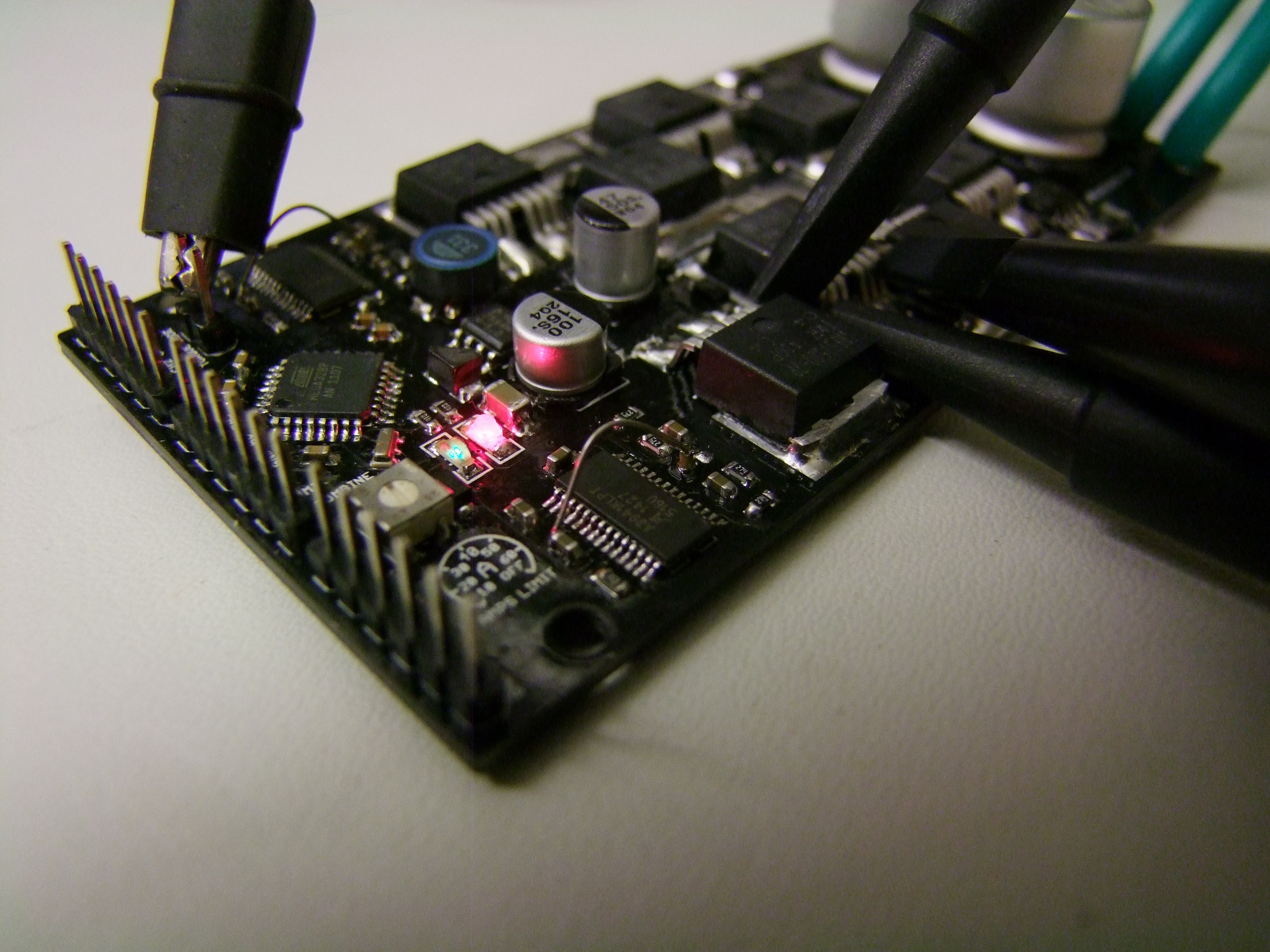
One bug I ran into right away: The gate drives wouldn’t enable. A little bit of prodding with an oscilloscope led me to discover that they were not receiving a power supply. Weird, but the 5v logic rail is feeding into the chip fine, and the chip is enabled, so the charge pump should be running…

That was when I discovered that I had mislabeled the charge pump pins when transcribing from datasheet to Eagle part.

On the A3941, there are a lot of doubled pins, like CP1/CP2, VBB, GND, and the like. In my infinite wisdom, I thought that VREG needed its own capacitor like CP1/CP2 does, instead of just needing to be 2 pins connected together, and a capacitor goes between VREG and GND.

So that’s why the gate drive rail was not energized – no capacitor, no fun.

Oops. Pretty much all version 1 boards need some little wire jumps. I upturned the capacitor and soldered a jumper wire to the nearest available GND pin. It will do for firmware work!

Onto the firmware itself. For this version of Rage, I wanted to try having the ADC running synchronously with PWM, to capture a real-time current every time the controller switches. Not only does this simply offer vastly increased current control resolution for the DC controller, but synchronous sampling of current is basically required for torque control of brushless motors. There are some hackish ways around it, of course, like the Chinese e-bike controllers’ hardware-implemented cycle by cycle current limiting, but if your microcontroller has the ADC horsepower, it’s possible to implement many different closed loop control methods in software. And I looooove software.

The ATMega328’s wimpy ADC is just fast enough to do this, somewhat overclocked, at 15.6kHz PWM. It will up the temporal resolution of the Hysterical Current Limiter by more than 8x – currently, it runs 1000 times a second using whatever current reading it had last. However, because there is only 1 ADC on the chip, it has to be multiplexed to read the two current sensors on alternating PWM cycles. Therefore, the real sampling rate of the current is more like 8kHz – hence the 8x instead of 15x speedup.

Whatever the case is, I consider it more software practice than anything for Brushless Rage.

So here’s all the setup that had to happen, written in the form of a code novel:

  //Set up Timer 1 for the following:
  //Change the WGM bits on TCCR1A and B to Phase Correct 9 bit PWM 
  TCCR1A &= ~(1 << WGM10);
  TCCR1A |= (1 << WGM11);
  TCCR1B &= ~(1 << WGM12);
  TCCR1B &= ~(1 << WGM13);
  //Change CS1:0 bits to no prescaling (31372hz pwm if we used 8-bit PWM that is standard, 15655hz with an extra bit of resolution)
  //As a result of the change to 9-bit, AnalogWrite( ) will take 0-511 instead of 0-255
  TCCR1B |= (1 << CS10);
  TCCR1B &= ~(1 << CS11);
  TCCR1B &= ~(1 << CS12);
  // Enable the Timer 1 overflow interrupt which will trigger a subroutine at the Bottom of every PWM cycle (16khz)
  TIMSK1 |= (1 << TOIE1); //Set TOIE1 and nothing else
  
  //Set up the ADC for the following:
  // Set ADC prescaler to generate a 1 MHz ADC clock; this increases the sampling speed 8x at a cost of ~ 1 LSB of resolution. 
  ADCSRA = ADCSRA & 0b11111000 | 0x04; //Set ADSDP2, clear ADSP1:0
  // Set ADC to auto-trigger on Timer 1 overflow interrupt
  ADCSRA = ADCSRA | (1 << ADIE); //Set ADC conversion complete interrupt 
  ADCSRA = ADCSRA | (1 << ADATE); //Set ADC auto trigger enable 
  ADCSRB = ADCSRB & 0b11111000 | 0x06; //Set ADTS2 and ADTS1; clear ADCTS0, to select Timer 1 overflow as the trigger source

The way I code is to write more comments than there are lines of functioning code, in excruciating depth of exposition. I do this not only because I can’t be buggered to remember what these registers do in a week, but so other people who are forging into non-Arduino territory can more easily get what’s going on. Manual register configuration, sadly, is still how much of embedded programming works.

(I promise to rip on manual register configuration EVERY TIME I make a software post. Every. Time.)

Down at the bottom of this short testing code, I have the ISRs for the ADC and the PWM timer:

ISR(TIMER1_OVF_vect) {
  //Quick Pin D5 (Port D pin 5, "COMBINE" on the RB2 board) toggle to indicate we are in the ISR, for debugging
  PORTD &= ~(1 << 5); 
  PORTD |= (1 << 5);
  
  slow_loop_prescale_counter++;
}

ISR(ADC_vect) {
  //Quick Pin D4 (Port D pin 4, "MIX" on the RB2 board) toggle to indicate we are in the ISR, for debugging
  PORTD |= (1 << 4);
  PORTD &= ~(1 << 4);
  
  byte low, high;
  low = ADCL;
  high = ADCH;
  hot_amps = (high << 8) | low;

}

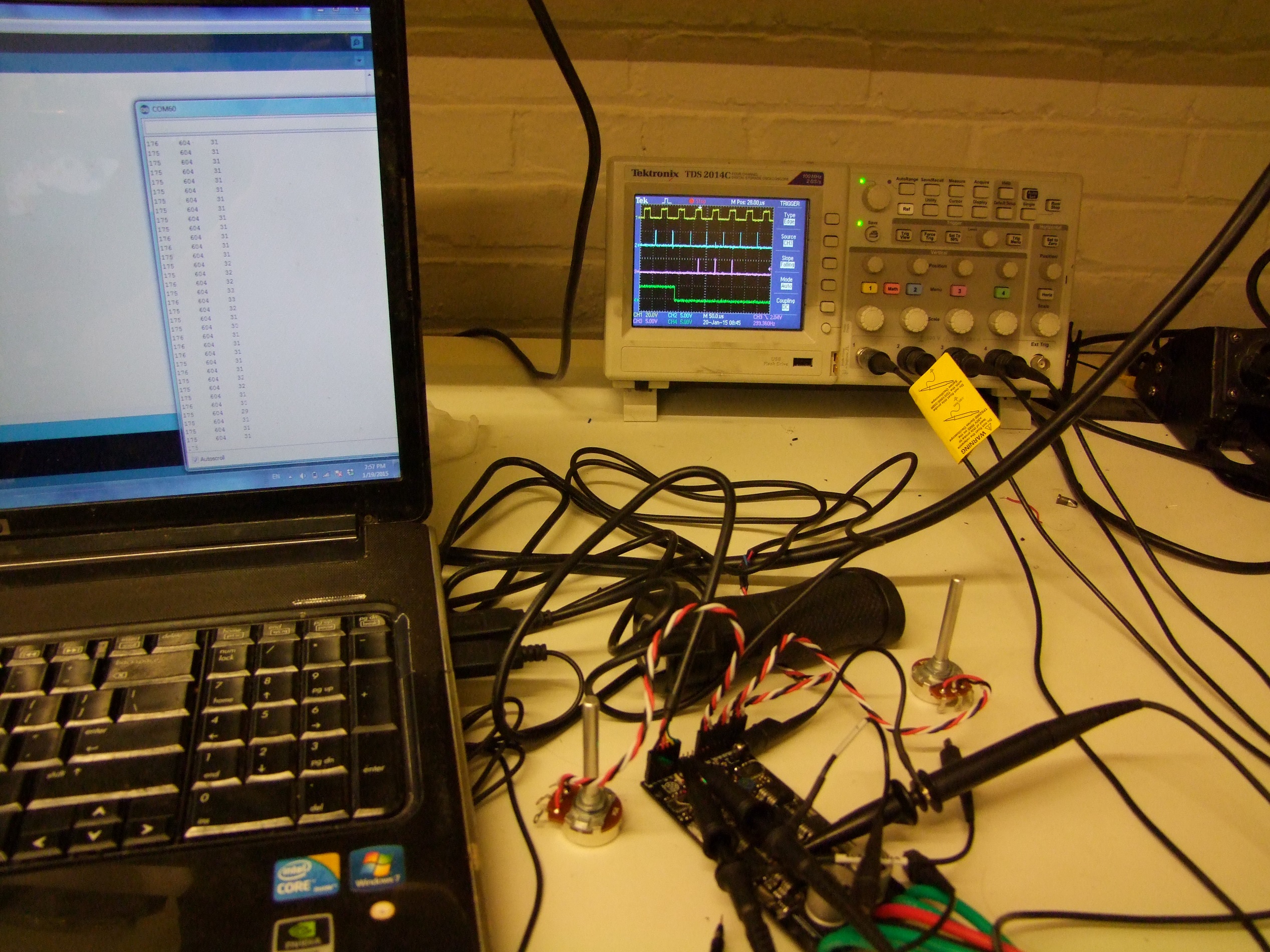
The result of this is the following beautiful scope photograph:


The first trace up top is the PWM timer (Timer 1) overflow interrupt. This is the center of a PWM cycle, and is when the ADC is set off. A few (dozen) microseconds later, the ADC conversion complete interrupt service routine executes, which is the blue trace. At this point, a new current reading is available.

The purple trace is the ‘slow loop’, which runs a few hundred times a second using a software prescaler value. This is where inputs would be taken and new outputs calculated.

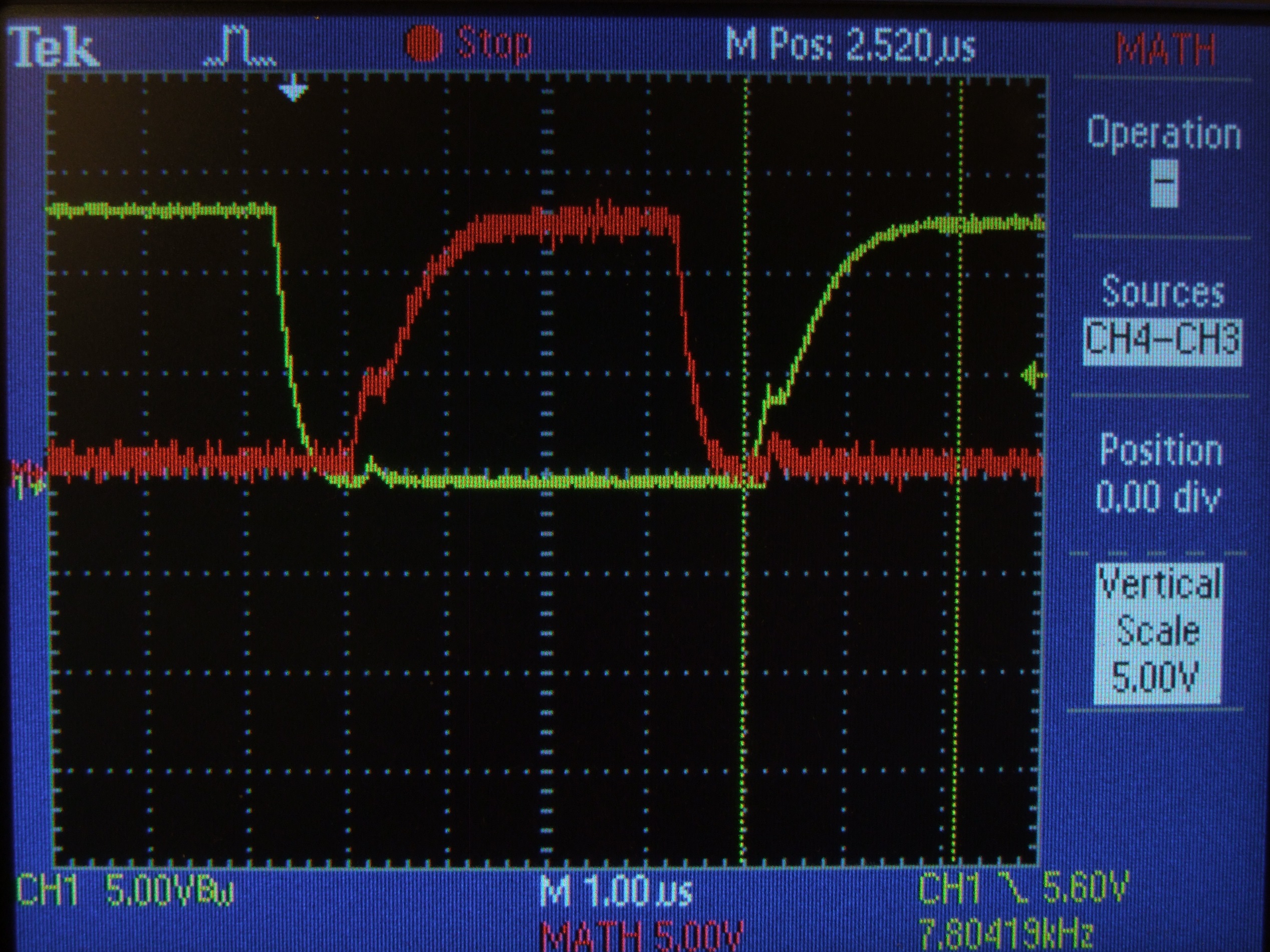
So how’s about the gate drives? Here’s a low-side trace directly at the gate of the FET. The total switching time is right around 1 microsecond… which is dismal for what I’m used to, but serviceable. Small fully-integrated driver chips are going to be wimpier than the IRS21844s that RageBridge v1 used, which are more often used on higher voltage systems with much larger devices.

Some differential scope probing and a high-side gate waveform also appears. Unless you have a scope with completely isolated channels, don’t try to probe both the high and low side gates at the same time. This kills the gate.

What happens is, non-isolated scope probe grounds basically short the high-side gate drive through the ground clips, resulting in (usually) the gate driver dying. Don’t make my past mistakes, kids. You’ve been (repeatedly) warned.

This was the extent of the firmware work before I left for China. I tried telling myself I’d work on it while traveling, but hah, yeah right. Looking ahead, however, I made some design changes while in Beijing, and right before leaving Japan, I fired them off. Here is board revision 2, featuring…. well, not much difference. Some component placements have been relieved, but otherwise the power side circuitry is identical.

The biggest “duh” moment of handling my revision 1 boards was… there are through-hole headers everywhere. If I’m going to make a plate-style heat spreader like RageBridge v1, the through-hole header elements should be as closely grouped as possible to minimize holes and cutouts. In board revision 2, I tried shoving as many of the headers to the left as possible – fortunately, with a little trickery, I got all of them.

The “Fan” pins are still located inboard because there’s no other good place for them. The difference between the 5V supplied by this set of pins vs. what comes out of the 5V pins on the left, and the one that goes to the microcontroller, is that Fan power is taken from the ‘dirty side’ of the regulator, before the feedback pin and the 2nd output filter. That means it’s really dirty, chunky 5V, pretty much only good for running dumb loads like fans or gaudy lighting.

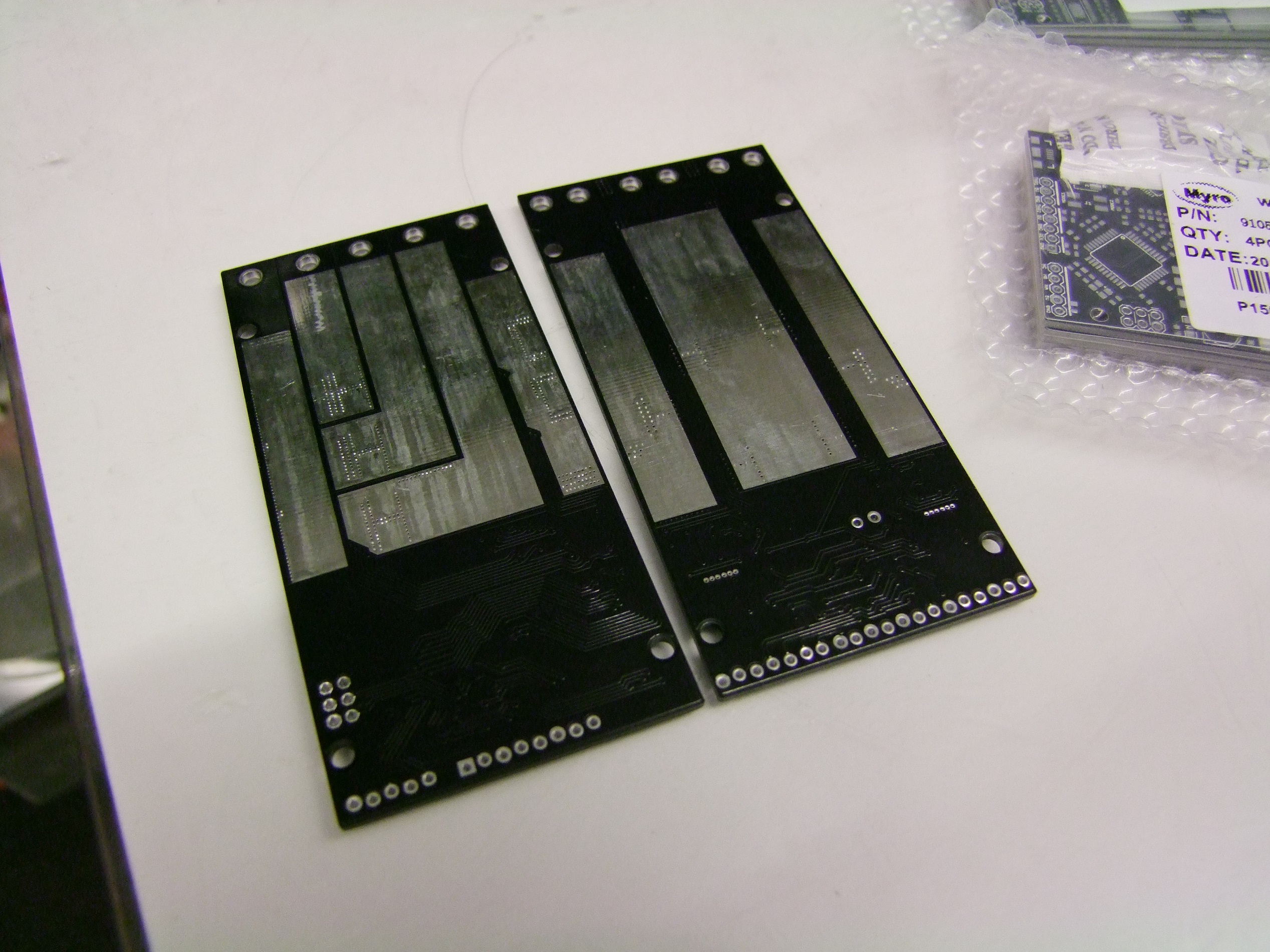
A week and some later, Revision 2 board arrives, along with…

… Brushless Rage!

Much to many peoples’ disappointment, Brushless Rage is going to be addressed when Brushed Rage is working and out the door, because it has a more critical ship date.

The backside of these boards is mostly made of soldermask-stop due to the high currents they’ll be conducting. Between this and the heat spreader plate will be a silicone thermal sheet layer to discourage shorting.

I actually have not assembled the version 2 board yet, because power circuitry-wise, version 1 and version 2 are identical – only the jumper and header row is different (…and the mis-routed pins have been routed correctly…) Since I have a functioning version 1 board already, it will be the focus for firmware development, and probably the first one to get blown up.

Since confirming that the ADC auto-trigger-upon-PWM-timer-interrupt system works, I next had to work out how to differentiate one reading from another. Here’s the issue, though: it would be easy to say “every other reading is either one or the other current sensor”. It’s not as easy to incorporate reading other analog inputs. I’m planning on building “analog mode”, for small silly rideable things, from the outset this time instead of promising to get around to it eventually.

While it would be “easy” to have an Arduino analogRead() plow through my already set-up ADC triggers every once in a while, in the interest of more robust code structure I decided to create a convoluted state machine to have the ADC interrupt routine determine what in the name of Sam it just read.

The basic idea is this. Every “slow loop” will request a new set of inputs (if in analog mode). The ADC ISR will merge these requests in with the current sensor reads automatically and update temporary holding variables just like it would for current. If inputs are being requested at the time the ADC is reading a current, then it will immediately reload the ADC, switch it over to the input under scrutiny, and read again, ideally finishing in time for the next current sample.

The full state logic I wrote down literally read like a bad text-based RPG.

You wake up in a dark room. You are an ADC. In your hand is a conversion result.
You must figure out what variable to assign this conversion result to.
> look
 On the wall besides you are three lists of the same words over and over, all scratched out
except the bottom-most, and all stating that something is TRUE or FALSE.
> read

The list says:
READING_CURRENT = FALSE;
READING_CURRENT = TRUE;
...
and
INPUTS_REQUESTED = FALSE;
INPUTS_REQUESTED = TRUE;
...
and
WHICH_CURRENT_TO_READ = FALSE;
WHICH_CURRENT_TO_READ = TRUE;
...
It is clear the lists were made in your handwriting.
You can read the last thing you write using (current), (which), or (inputs).
When you are ready to guess what variable to assign your conversion result to, you can use (assign).
> inputs
INPUTS_REQUESTED is false.
> current
READING_CURRENT is true.
> which
WHICH_CURRENT_TO_READ is true
> assign
To take a guess at which variable to assign your conversion result to,
type the name of the variable (ia, ib, inputs[0], inputs[1], or inputs [2])
> ib
Before the memory bus was selected for a write, you were eaten by a grue.


See? It’s that simple!

The variable names are all real, and here’s how they interact.

Each PWM timer overflow interrupt, the READING_CURRENT flag is set, and the interrupt handler immediately sets the ADC going. When the ADC finishes about 15 microseconds later, the ADC conversion complete interrupt handler executes and sees that READING_CURRENT is true.

There are only 2 current sensors, so a simple logic inversion flag WHICH_CURRENT determines if it’s motor channel 1 or channel 2. It will save the current reading in the appropriate variable, invert the logic flag, set READING_CURRENT to false (since we’re done), and then move onto switching the ADC multiplexer to the other current sensor pin.

Every once in a while, the slow loop will call for an INPUTS_REQUESTED = true condition. When the ADC wakes up from converting, there’s two possible things that happen:

  1. That READING_CURRENT is true and that INPUTS_REQUESTED = true, which means the next cycle is an input read and has to start immediately, or
  2. That READING_CURRENT is false and that INPUTS_REQUESTED = true; which means the next cycle has to be a current read since THIS one was an input read, or

If this cycle was an input read based on the two state variables, then assign the reading to an input variable – this is in the form of an array, inputs[0:2] so it’s easy to iterate through.

Finally, based on the condition of the two state variables, the ADC interrupt handler will reassign the multiplexer to reflect the next desired read. If it’s an input, it will start the reading immediately. If no more inputs should be read, it sets INPUTS_REQUESTED = false so that part of the logic doesn’t happen until the slow loop causes it again.

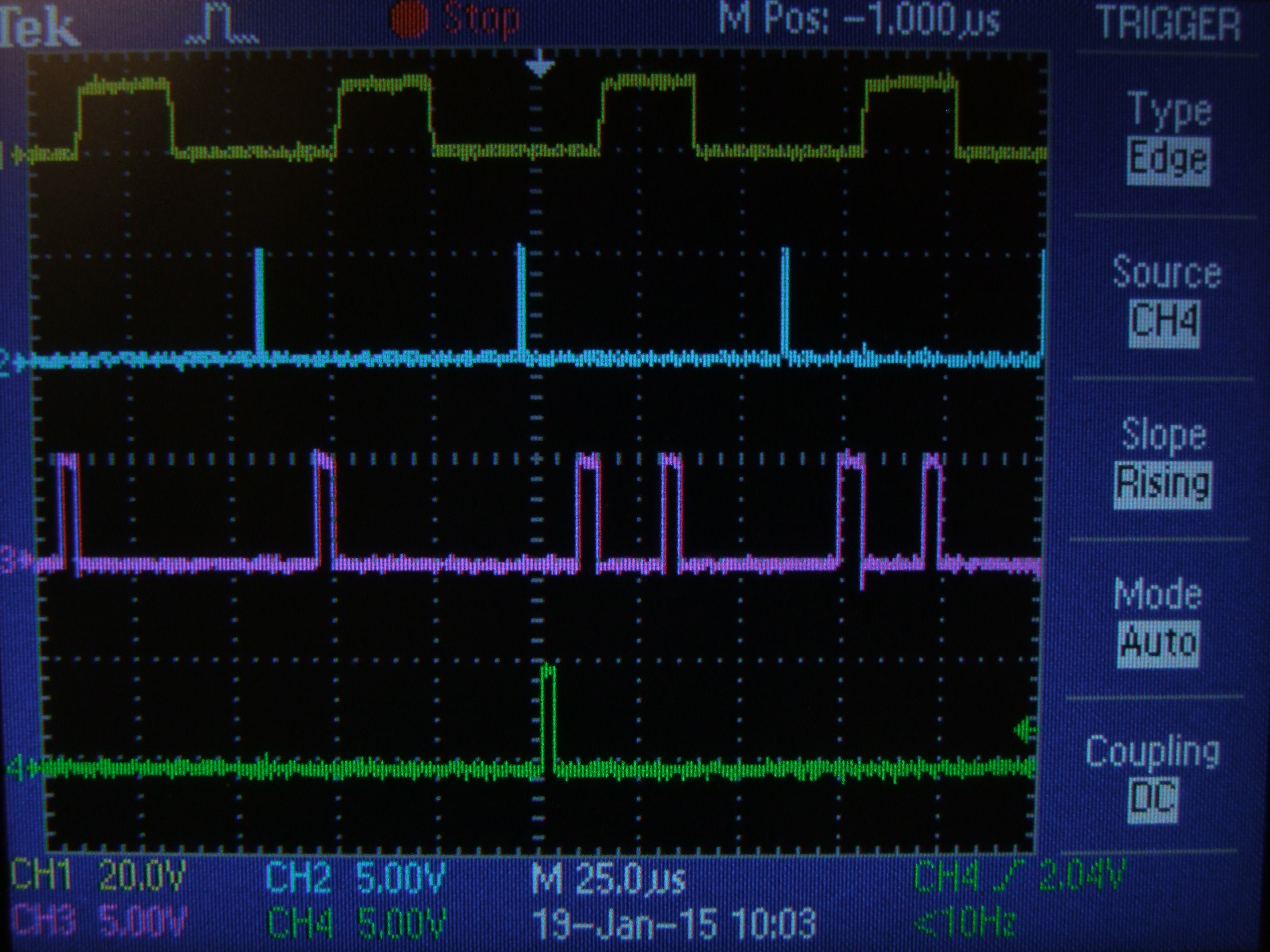
It looks like this on a scope:

In this scope shot, channel 1 (yellow) is reading an output PWM that I hardcoded for convenience.

The next one down is the Timer 1 overflow interrupt handler, which sets off the ADC every PWM cycle.

The channel 3 (purple) spike that lags each channel 2 spike by about 15 microseconds is the ADC interrupt handler executing and reading current.

The channel 3 spike that immediately follows the rightmost two current reads are input reads. The first is inputs[0], the next inputs[1], and so on.

Channel 4 is the “slow loop” which, in this test code, serves only to set INPUTS_REQUESTED = true in order to irritate the ADC.

I was having trouble getting functional readings out of this setup, however. It seems like the current sensors were reading just fine, but the test inputs (which were potentiometers) were exceptionally noisy and inconsistent. I pondered for a while over this, and even refactored the above code from scratch to try and distill away any logic errors on my part.

No change. I even tried slowing down the ADC to only 4x the default Arduino speed – perhaps my potentiometers were too high impedance and it couldn’t fill the sample-and-hold capacitor fast enough? Seemed unlikely, but worth a try.

As the above scope photo shows, when I slowed the ADC down, the readings started running into each other and some of the input reads did not complete at all, being paved over by the externally triggered current reads.

I became suspicious when I noticed that the input reads succeeded when I grabbed the potentiometers in the right away. Uh oh…

To differentially diagnose, I put on some rubber gloves and tried again, figuring that my body impedance was messing with the potentiometers. Same result.

In disbelief, I grabbed a potentiometer that I knew to be working from using it to test other motor controllers, as well as a Hall Effect twist throttle from one of the scooters. Worked perfectly.

In summary, it is absolutely possible to have all three potentiometers you harvested from the depths of the shop to be scratchy or oxidized and making poor contact, and have that make you think it’s entirely your fault that you can’t write software.

Five minutes later, three perfect analog readings with three perfect in-sequence reads interleaved with current sensor reads. In this scope shot, the purple trace is only the portion of the logic that handles writing the inputs variable. It executes three times for three analog inputs.

Gee, that was a hilarious, rage-filled evening.

At this point, I’m ready to dive into writing the part of the firmware I actually care about – taking those inputs and doing something with them. I’m going to put in analog and R/C driving right away. Here’s the anticipated ‘state table’ of operating modes:

  • R/C: Responding to signals in the 1100us – 1900us range, since it seems like that’s what radios put out by default. Failsafing behavior will check for valid/present pulse lengths on Channels 1 and 2, and shut down motor output if the signal is invalid.
    In normal mode, channel 1 controls motor A, channel 2 controls motor B.
    In MIX mode, channel 1 affects differential speed of the motors and channel 2 affects offset – what is usually called “Elevon” mixing, the most common configuration for robots.
    In COMBINE mode, by popular demand, motor A and motor B PWM % is synchronized in the timer to turn rage into a 90-180A single channel controller.
    MIX and COMBINE both selected is not a valid mode and will default to MIX.
    In default and MIX modes, INVERT causes motor direction and speed to be swapped between A and B
  • ANALOG: By default, channels 1 and 2 respond to signals from 0.1 to 4.9 volts with ‘zero’ being 2.5 volts. Voltages below 2.5 cause that motor channel to run in reverse, above in forward (for your definitions of forward and reverse). The signal bounds are for fail-safe behavior since if control signals get disconnected, it is more common for them to hit the voltage rails (0 and 5v) instead of hover somewhere in the middle.
    Channel 3 has no function. I mean, it COULD be an Invert input, but are you really going to drive your motorized couch upside-down?
    Failsafe behavior requires signals be at 2.5v (within the deadband) at startup, or else the signals must be brought to 2.5v first, to prevent unintended couch acceleration.
    In MIX mode, it assumes the use of a centered joystick or similar control setup, and its output behavior is similar to MIX mode in R/C.
    In COMBINE mode, Rage becomes a 1 channel DC electric vehicle controller. The controller will respond to voltages of 1.0 to 4.0 volts, since that is the most common range for hand and pedal Hall Effect active throttles and potentiometer throttles set up as voltage instead of ohms (increasingly uncommon).
    Motor outputs A and B are paralleled by default.
    Channel 1 controls positive (driving) current from 0 amps to 2* IMAX amps.
    Channel 2 controls negative (regen braking) current from 0 amps to 2 * -IMAX amps. Continually holding brake will not result in reversing. This is a bit of an unusual setup, but in my past experience, more people want their vehicle to coast by default instead of brake (drag braking) by default.
    Channel 3 becomes a reverse switch depending on its digital logic state.
  • And of course, TTL Serial input, which is not high priority right now but will let Rage bust into the comically large servomechanism market. I suspect I will structure this as “simple serial”, compatible with many other small robot controllers – sending byte values 1 through 127 with 63 as center (0x01 to 0x7F with 0x3F center) controls channel 1 in forward and reverse, and 128 to 255 with 192 as center (0x80 to 0xFF with 0xC0 center) respectively for channel 2.
    Sending 0x00 shuts down all motors to coasting condition.
    In this case, Channel 3 is used as a ‘device select’ line.

These expectations might change once I get started coding. In particular, with respect to the ADC readings, I have yet to try to take any samples under power. It could be that system noise from the motors and FETs switching might make individual samples worthless. That might imply some more state machine trickery, such as if I have to read currents and inputs more than once, etc.

Right now, it’s anticipated that Rage will try to find the input mode on its own when it wakes up. After waiting for half a second upon power-up, it will…

  1. Obtain MIX or COMBINE status by reading those pins
  2. Check for bytes in the serial buffer; if there are, become Serial mode.
  3. Check for analog voltages at the 3 channel inputs, whether 1.0v or 2.5v depending on MIX/COMBINE mode; if there is the proper voltage present, enter Analog mode.
  4. Barring that, sit quietly for a few more milliseconds to listen for R/C pulsewidths; if there are valid ones, enter R/C mode
  5. If all of those steps fail, blink in futility, and re-attempt these steps once per second.

Man, it seems like “make it drive motors” is the easy part.